Meet Rowan, your AI financial copilot
Know your balance before it happens.
Time tracking, invoicing, and cash flow forecasting in one place, for consultants and solo operators who bill clients. Rowan, your AI financial copilot, reads your transactions, forecasts cash flow, and estimates quarterly taxes.
See where Rowan shows up in the app →
Forecasting, taxes, clients, invoices, and Rowan, together in one calm dashboard.
Real product UI from the Pyne dashboard.
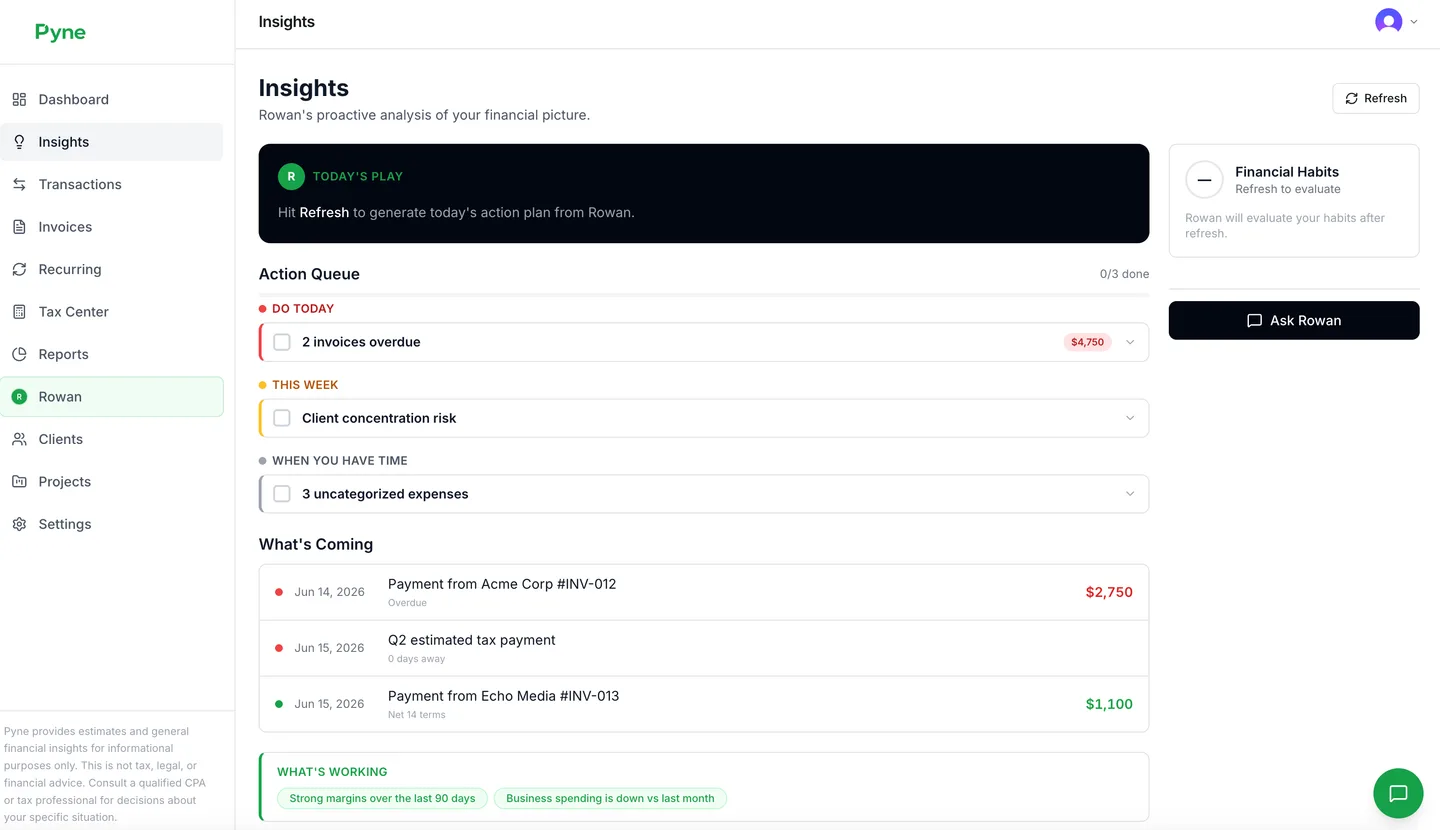
Insights that look ahead
Pyne turns your transactions into forward signals: what is trending, what is about to get tight, and where your money is really going. Not just a record of the past. A read on what is coming.
Product screenshot from the live Pyne app.
You’re great at the work. The money side shouldn’t slow you down.
Most tools show you the past. You need to see what is coming, with time to plan for it.
Cash flow guesswork
Invoices, subscriptions, and taxes don’t line up on a calendar. Without a forward view, you’re always wondering if you can afford the next month.
Tax season panic
Quarterly estimates sneak up. Deductions live in your head, or nowhere. You deserve running totals, not year-end surprises.
Too many tabs, not enough clarity
Spreadsheets, bank exports, and half-connected apps don’t talk to each other. Pyne pulls the story into one place so you can decide faster.
Clients pay late. Your bills don’t.
See which bills each expected client payment covers before the week gets tight. Late money shouldn’t be a surprise on rent day.
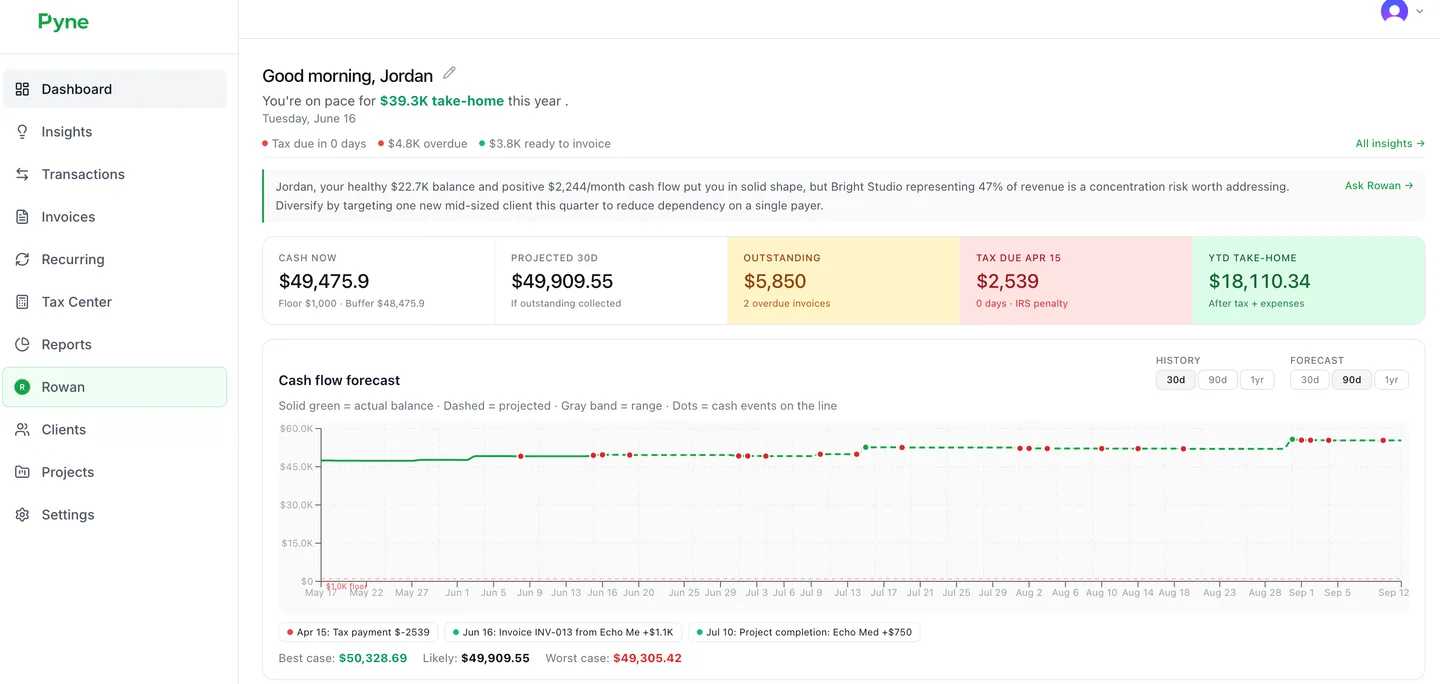
Cash flow forecast from the live Pyne app.
How Pyne works
Three steps from chaos to clarity. No finance degree required.
- 1
Connect or enter in minutes
Add transactions manually, import CSV, or connect bank sync and the tools you already use on Pro.
- 2
Pyne organizes and explains
Smart categorization, client and project context, and a living financial snapshot you can actually trust.
- 3
See what is coming
Cash flow forecasts, tax estimates, and Rowan answers grounded in your numbers, not generic household budgets.
Built into Pyne
Meet Rowan
Your AI financial copilot, built into every screen
Every screen below shows where Rowan shows up: briefings, annotations, and summaries. Guidance from your real numbers, not just charts.
Built into every screen
Rowan explains your numbers, flags what needs attention, and answers questions in plain language. Ask about invoices, cash runway, or client mix. Rowan pulls from your real transactions, invoices, and time tracking. Rowan is a copilot that shows visibility, not an advisor that tells you what to do.
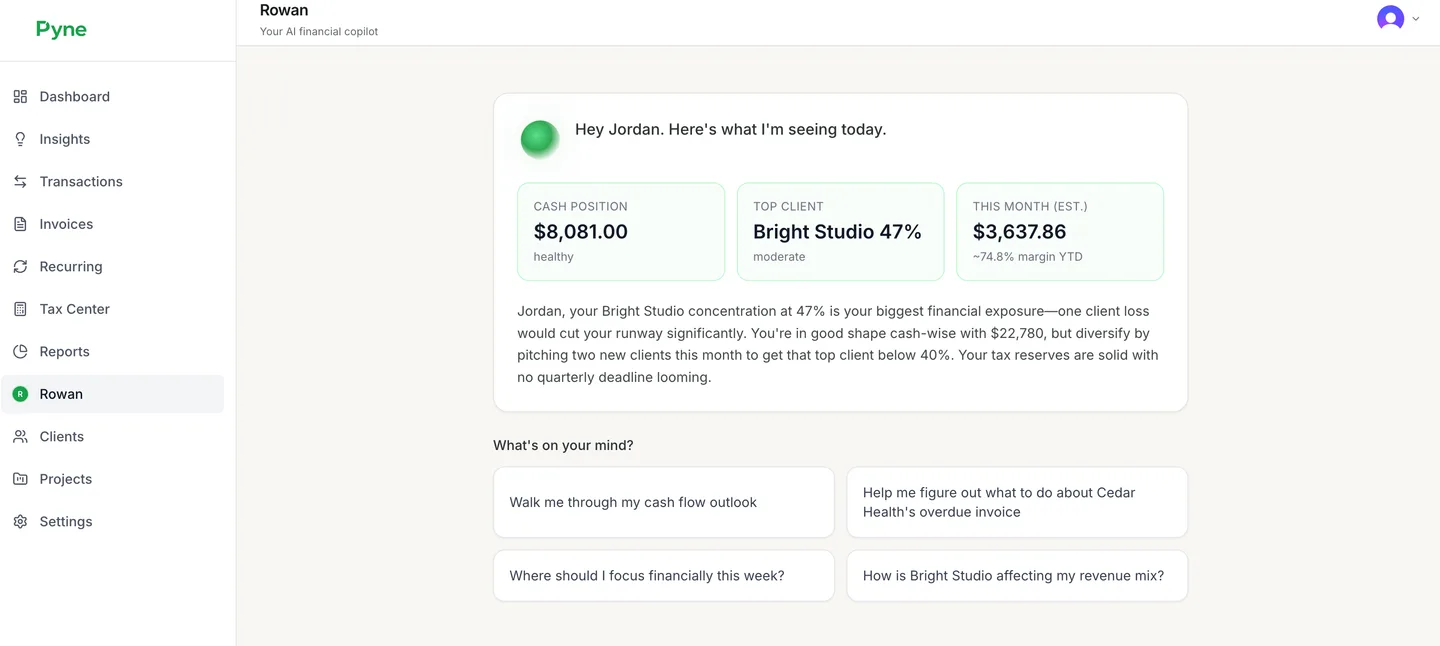
Product screenshot from the live Pyne app.
Cash flow forecast up to 12 months
See when money lands, what is recurring, and where your cushion could dip before it happens. Free covers 30 days, Pro unlocks 90 days, and Pro+ opens the full 12-month view.
Product screenshot from the live Pyne app.
Tax Center with quarterly estimates
Directional federal and state estimates that move with your income and deductible expenses. Educational estimates only. Always confirm with a qualified professional before you pay or file.
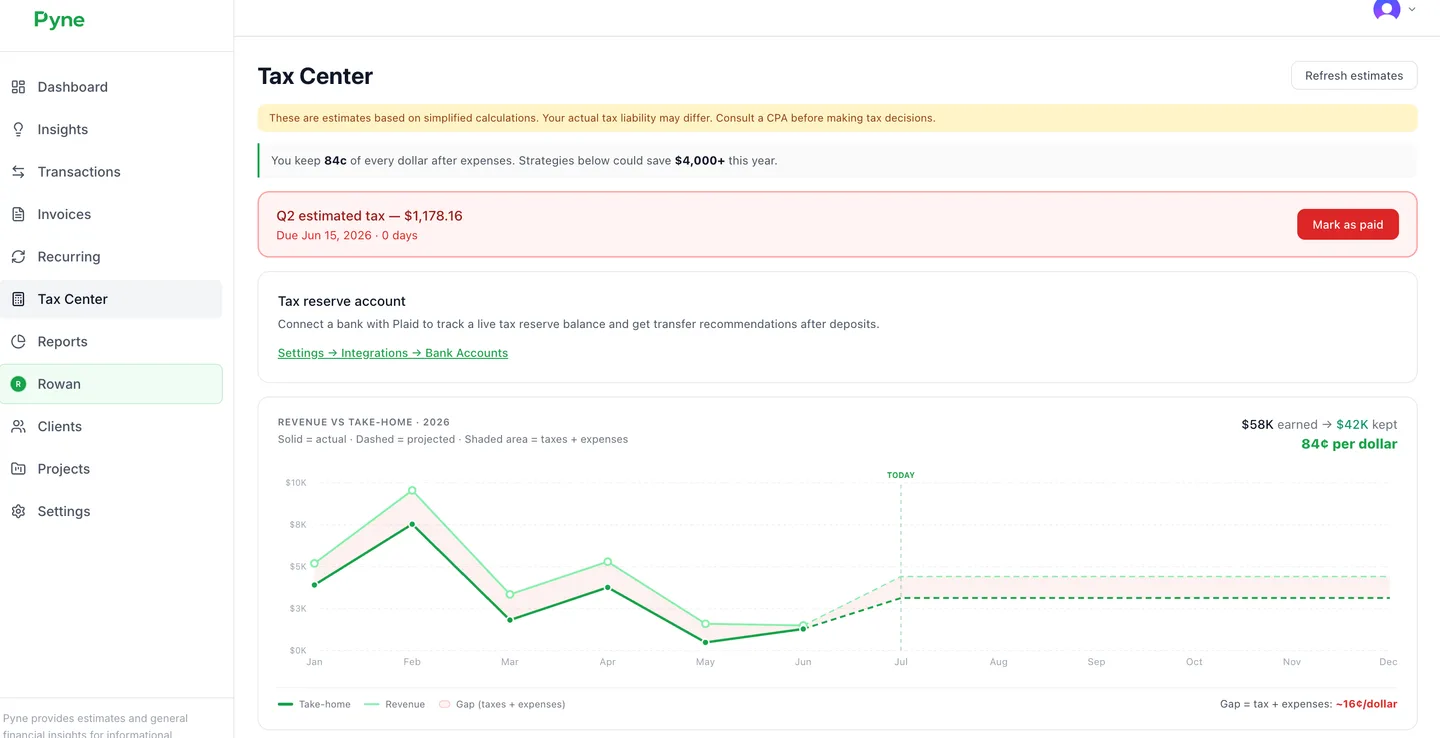
Product screenshot from the live Pyne app.
Clients, projects, and effective rates
Know which clients drive revenue, how your quoted rate compares to what you actually earn per hour, and where unbilled time hides. Pro+ adds project profitability and scenario modeling.
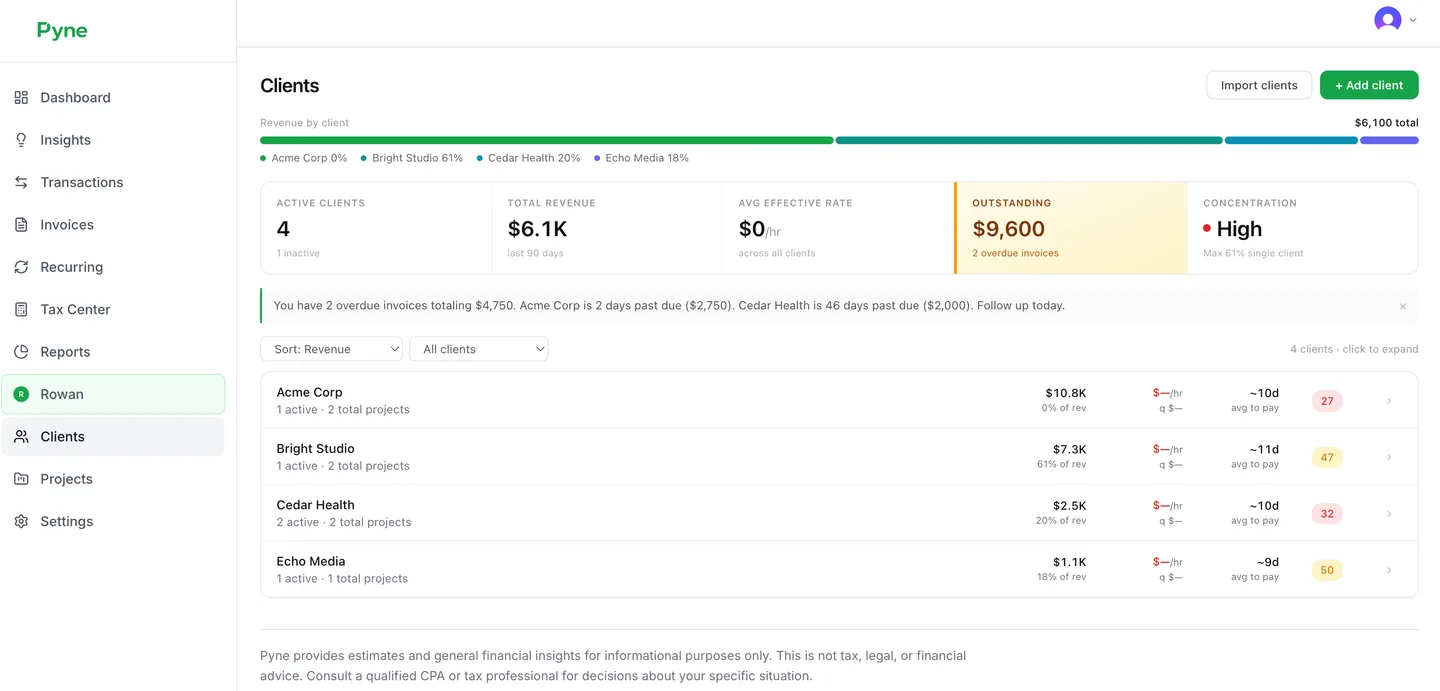
Product screenshot from the live Pyne app.
Invoices that stay visible
Professional PDFs, email delivery on Pro, payment links, and signals when money hits your accounts. Itemized hourly invoices stay tied to tracked time so you can see what was billed.
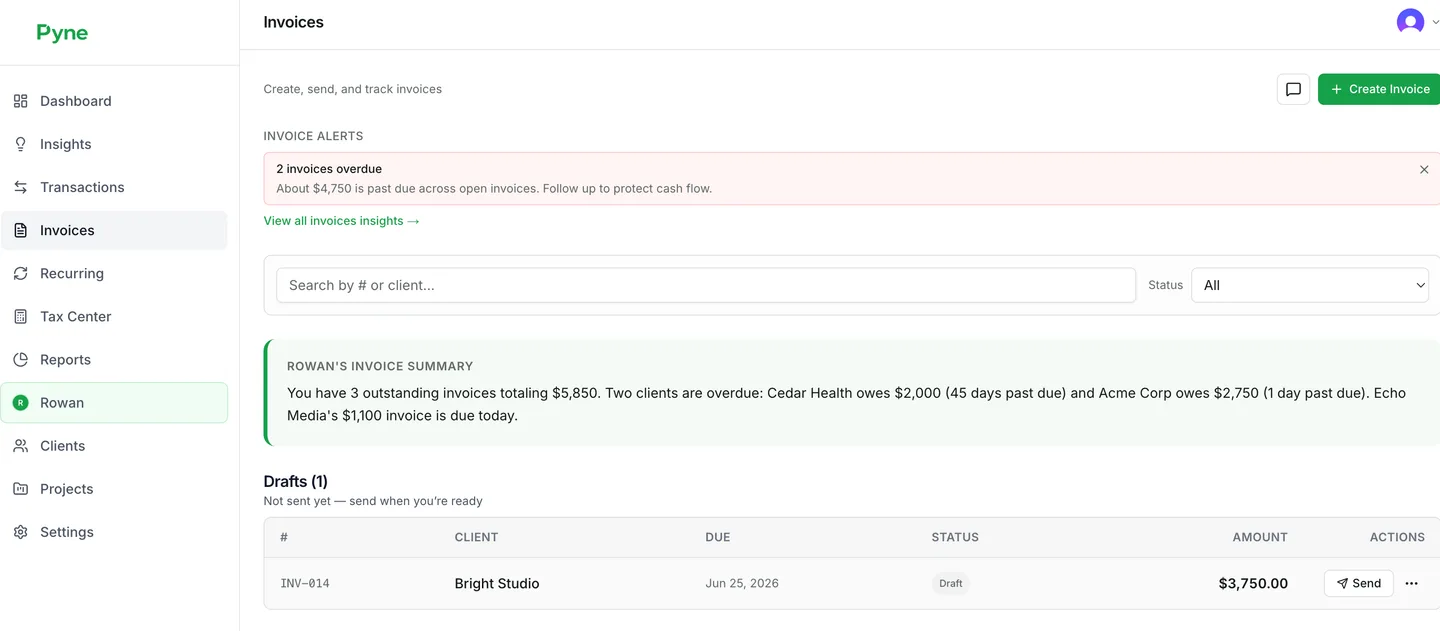
Product screenshot from the live Pyne app.

Built by someone who bills clients too
Tyler Nelson, Founder
I run a consulting practice on Pyne every day. Time, invoices, and cash flow used to live in three places. Now they live here.
Pricing that respects your runway
Start free. Upgrade when Pyne is clearly saving you time and preventing expensive surprises.
Founding Members: 4 of 100. Lock today's pricing for life, get a direct line to the founder, and help decide what we build next.
Built for solo operators who bill clients. Not built for teams with payroll or inventory.
Free
Get started
- Up to 50 transactions per month
- 30-day transaction history
- Manual transaction entry
- Dashboard & basic summaries
- Rowan (Haiku, 3/day)
- 30-day cash flow forecast
- Export your data anytime
No credit card required
Pro
For consultants who bill clients
or $490/yr (2 months free)
- Everything in Free, plus:
- Unlimited transactions & full history
- Tax Center with estimates & strategies
- 90-day cash flow forecast
- Plaid bank sync, CSV & Google Sheets import
- Clients, projects, invoices & recurring
- Full Insights feed & weekly email digest
- Integrations (Stripe, PayPal, FreshBooks & more)
- Time tracking imports (Toggl, Clockify, Harvest)
- Manual time entry in Pyne
- Rowan on Sonnet
Cancel anytime from billing settings.
Pro+
For power users
or $990/yr (2 months free)
- Everything in Pro, plus:
- Full Plaid sync (balances + recurring detection)
- Project profitability & effective rate analysis
- Tax reserve tracking & allocation rules
- Schedule C preview + PDF export
- Scenario modeling
- 12-month cash flow forecast
- Accountant sharing
- Rowan on Opus
Best AI and longest forecast horizon.
Pyne provides estimates and general financial insights for informational purposes only. This is not tax, legal, or financial advice. Consult a qualified CPA or tax professional for decisions about your specific situation.
Frequently asked questions
Straight answers about security, taxes, and what Pyne is (and isn’t).
No. Pyne provides estimates and educational insights only. Tax content is education, not advice. Always confirm tax decisions with a qualified professional.
No. Pyne is read-only for connected data and does not initiate payments or file returns.
Core tracking with limits: up to 50 transactions per month, 30-day transaction history, Rowan (Haiku, 3/day), manual entry, and data export anytime. Tax Center, CSV import, bank sync, time-tracker imports, and more unlock on Pro.
Unlimited transactions and history, Tax Center, 90-day cash flow forecasting, full Insights, Rowan on Sonnet, integrations, clients and projects, invoicing, recurring items, time-tracker imports, and weekly email digest. Pro is $49/mo or $490/yr.
Pro+ is $99/mo or $990/yr. It adds Rowan on Opus, 12-month forecast, scenario modeling, project profitability, tax reserve tracking, Schedule C preview, and accountant sharing.
Yes. From Settings you can download a JSON export of your transactions, invoices, clients, projects, time entries, and recurring items. Forecasts are recalculated from that data when you bring it elsewhere.
We use industry-standard encryption in transit and at rest, trusted auth providers, and we don’t sell your financial data.
Rowan runs on Anthropic’s Claude models. Free: Haiku (3 messages/day). Pro: Sonnet. Pro+: Opus for deeper financial analysis. Rowan is a financial copilot, never an advisor.
Yes. Manage your subscription in the billing portal; you’ll keep paid access through the end of the paid period.
Stop guessing. Start knowing.
Join consultants who want their numbers as clear as their client work, without living in a spreadsheet.
Start using PyneNo credit card required on Free